Hey, I’m losing my mind with this and could really use some advice.
I’m trying to stream on Twitch and play games at the same time, but every time I go live my game ping gets awful. Sometimes the stream starts dropping frames, sometimes the game starts lagging badly, and sometimes both happen at once.
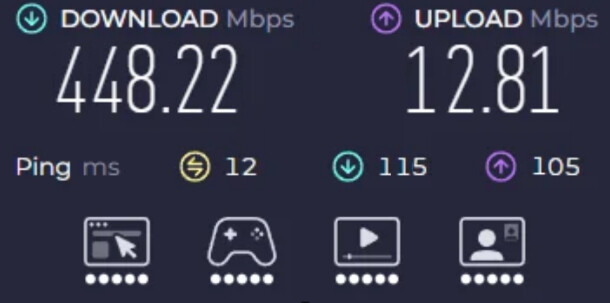
My latest speed test shows around 448 Mbps download and only about 12.8 Mbps upload. Idle ping looks fine at 12 ms, but under load the latency jumps to around 100+ ms, which seems like bufferbloat to me. Download is usually fine, but upload feels really limited, and when I stream it gets ugly fast. Is this something I can fix with router settings, or am I stuck with bad upload from my ISP?
Your screenshot screams upload bottleneck.
Interference could absolutely be part of this, especially in an apartment. If your Wi-Fi channels are packed, every wireless device in your place is basically fighting for airtime with your neighbors. That can make video calls, TVs, phones, and laptops act random even if your wired PC is better. Run NetSpot or another Wi-Fi analyzer and check what’s happening around you: channel overlap, signal level, 2.4 GHz congestion, and whether your 5 GHz channel is crowded too. If you’re sitting on the same channel as half the building, changing channels or moving more stuff to 5 GHz/6 GHz could help. But that won’t fix the tiny upload by itself. You may have two problems layered together.
What Twitch bitrate are you using?
@XN_doctorX_11 I’ve been streaming at around 6000 kbps because that’s what most guides recommend for 1080p.
Try lowering the stream bitrate to 3500–4500 kbps and test again. It may not look as crisp, but it’ll give your connection breathing room.