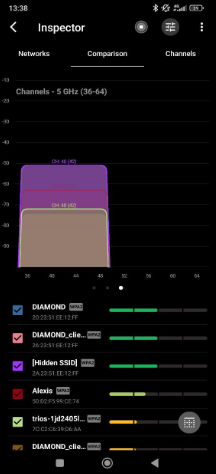
A few days ago I changed my Asus RT-BE90U router’s 5 GHz channel and locked it to 40 because I was having trouble getting a Wi-Fi extender to connect.
Since then the whole thing has somehow gotten worse.
Did I pick a bad channel or what?
A few days ago I changed my Asus RT-BE90U router’s 5 GHz channel and locked it to 40 because I was having trouble getting a Wi-Fi extender to connect.
Since then the whole thing has somehow gotten worse.
Did I pick a bad channel or what?
Why 40 specifically? Are you actually sure it’s clear?
@LengthinessThen4359 Mostly because I kept seeing it listed as one of the recommended channels to choose from. The thing is, in the router page I only see my own channel. I have no idea how to tell whether neighbors are already sitting on it too.
That’s exactly what channel scanners are for. Try NetSpot. It’s pretty easy to use, and it’ll show you what’s actually around you — nearby Wi-Fi networks, including hidden ones, plus activity on 2.4, 5, and 6 GHz. That way you can see whether channel 40 is actually clean or whether it just sounded good on paper.
Yeah, “recommended” doesn’t mean it’s empty. It just means it’s one of those basic non-DFS channels everyone goes to. Which usually means a ton of other people are crowded on it too.
@Dilemma_Fixer Welp, checked it, and yeah, 36 is definitely not as free as I thought it was. Although 48, 149, and others are absolutely free.