Hi everyone,
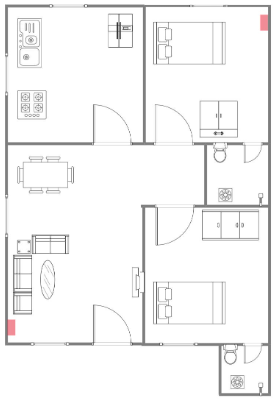
I’m planning my first proper home network setup and could use some advice. The house is one floor. I marked the two places where I’m planning to install wall-mounted access points in red.
I was looking at TP-Link Omada gear, probably something like an Omada router, PoE switch, and one or two wall APs. Ceiling mounting is not really an option, and I don’t want to run visible cables everywhere.
Does this layout make sense, or would you change anything before I pull cable?
Why two APs for that size of place?
@EnvironmentalCup4452 I was thinking two would just give better coverage. One for the living side and one for the bedrooms. I figured stronger signal everywhere would be better than trying to cover everything from one spot.
That’s a really common first setup mistake. More APs doesn’t automatically mean better Wi-Fi. Sometimes it means too much overlap, more airtime contention, and worse roaming. Especially in a smaller place where both APs can still “hear” most of the apartment. If you use two, don’t run them both at max power. Same SSID/password is fine, but use different channels and tune transmit power after testing.
Before you pull cable to both red spots, I’d model it first. A planning tool like NetSpot would be useful here. Load the floor plan, set the scale, draw the walls, choose realistic wall materials, and test the two planned AP locations virtually. Then compare that with one AP in a more central-ish spot, if you have any possible alternative. Those red spots are both pretty close to outer walls/corners, so the model may show you’re pushing a lot of signal outside while still having awkward overlap inside. NetSpot good for seeing whether two APs actually help or whether you’re just creating extra Wi-Fi noise.
If you go with Omada, use the controller settings properly. For 2.4 GHz, keep it 20 MHz and don’t let both APs scream across the whole flat. For 5 GHz, pick non-overlapping channels if possible. After install, walk around and check signal/roaming instead of trusting the default auto settings forever. The hardware choice is probably less important than placement + power + channels.
Ok, thanks for the advice, I’ll keep that in mind. I honestly thought two APs would just make the Wi-Fi better, but I see now it can also create overlap issues if I don’t set them up properly.