Hey guys, desperately need some help here. I’ve been trying to play Warzone tonight on my PC, and it’s completely unplayable. My latency keeps jumping from 40ms to over 600ms every few seconds, and I keep rubberbanding all over the map.Usually, my connection is totally fine and smooth, but tonight it just went to shit. Nothing has changed in my room. Router is downstairs. Any ideas on how to fix this? I already restarted my PC and the router, but it didn’t help at all.
“Wi-Fi” and “Warzone” in the same sentence, classic. Run an ethernet cable, dude. Problem solved.
@Alacran_X_00 I literally can’t drill holes through the ceiling, my landlord would kill me. It has to be Wi-Fi.
If you want actual help, you need to provide some basic network info. What band are you on? 2.4GHz or 5GHz? What’s your channel width, and are your neighbors overlapping with your channel? Also, what’s your signal-to-noise ratio?
@progressus_on Honestly, you are speaking alien to me lol. I’m just a gamer, not a network engineer. I don’t know any of these terms or where to look them up on Windows. I just connect to my home Wi-Fi name and put in the password.
If you want to see exactly what the problem is without losing your mind in the command line, just use a basic Wi-Fi scanning app. There are plenty of free apps out there, like NetSpot, Wi-Fi Analyzer, and others. I usually use NetSpot. It’s pretty simple. You just open the app and see a list of nearby networks and information about them. It will show you the exact channel you’re on in plain English and provide a real-time signal graph. My guess is that your router automatically switched to the crowded 2.4 GHz channel tonight, or your neighbor just installed a new router on the same frequency. Check what band and channel it shows for your network.
@Fast_pony_XXX Ah, got it. Thanks for explaining like I’m five. I’ll download one of those scanners and see if I can find the channel info. Hopefully it’s just a wrong channel because this lag is driving me insane.
@Fast_pony_XXX This is what my screen looks like right now.
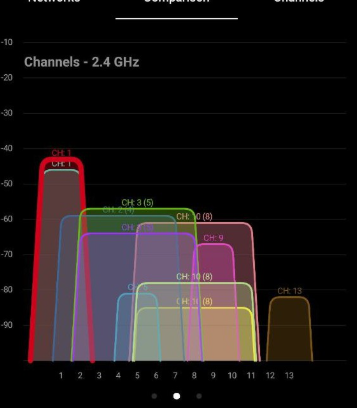
Damn, that’s a tough situation. Your 2.4 GHz band is an absolute zoo. Honestly, changing channels won’t save you here. You should seriously consider switching to 5 GHz.