Not sure where to place my router. Just moved into a new single-story house and I’m stuck on where to put my router.
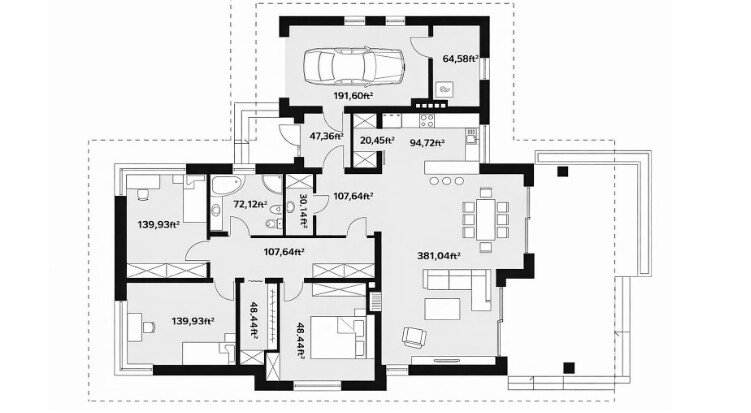
Floor plan attached. ISP will bring coax into the little utility room next to the garage. Right now I just have one Wi-Fi 6 all-in-one router. I mostly care about good Wi-Fi in the living room and the bottom-right bedroom (that’ll be my office).
Where would you put the router on this layout?
1 Like
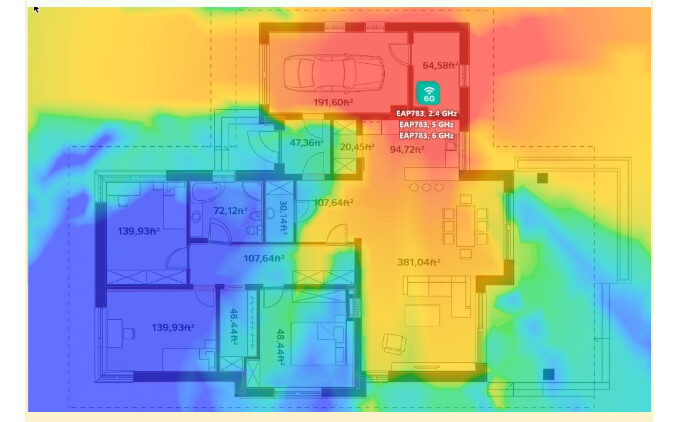
Listen, where exactly is your ISP’s entry point? And is there internet cable built into the walls, or are you planning on distributing everything via Wi-Fi only? If the fiber or coaxial cable enters that 6-square-meter closet near the garage and the electrical panel is located there, then it’s logical to place the modem and router there. From there, run the cable to one or two access points in the house. Looking at the layout, I would do it like this: One outlet in the large living/dining room (somewhere in the center of the interior wall between the living room and the hallway). If the study (the140 ft² bedroom at the bottom right) is an important space, then ideally it would be worth extending the cable there as well, placing a second small outlet there. It’s just that if you try to force a tiny control panel to be responsible for the network and distribute Wi-Fi throughout the entire house, then the far right edge of the house will be really “sad” in terms of signal.
No Ethernet in the walls unfortunately. ISP said they’ll bring coax into that small room behind the garage. Right now I can only put the router there or run one Ethernet cable somewhere else.
Please don’t put it in the bathroom, laundry, or right over the bathtub. Moisture + electronics is a long-term “fun” project.
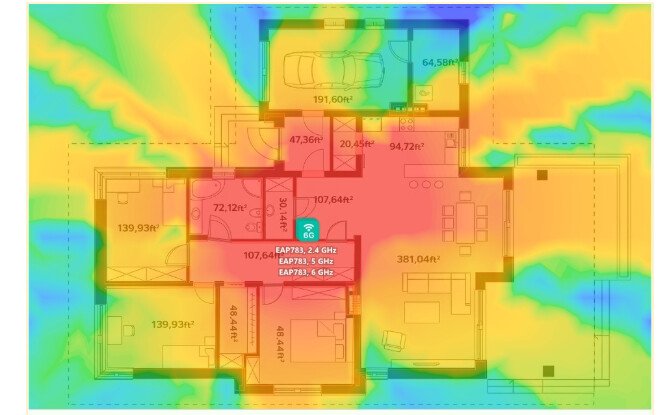
to get the АР, a picture isn’t enough. Wi-Fi is a fickle thing: the signal attenuates differently depending on whether you have brick or plaster, and whether there’s any rigid insulation in the walls. Your layout is simple, so it’s better to plan everything out in a program first than to drill holes in the walls later. Use a planner like NetSpot (https://www.netspotapp.com/), sketch out the walls, and simply drag the virtual access point to different locations: in the hallway, in the living room, or closer to the bedrooms. Moving an icon on the screen is much easier than moving a cable in real life.
1 Like
Look, the answer is obvious: place the router directly above the toilet in a large bathroom—then the signal for endless streaming will be just perfect. But seriously, I’m also in favor of the “hallway and higher” option. From that point, the signal literally “sees” every room, encountering a minimum of walls along the way.
@Ok-Cantaloupe-90 Thanks for the tip! I ended up giving NetSpot a shot. Had to shell out for the paid version since the planning tools aren’t free, but man, I’m actually hooked. I whipped up my floor plan and started playing around with AP spots… it’s weirdly addictive, haha. Feels like a mini-game trying to get the perfect coverage. Definitely beats guessing where the signal goes!
1 Like