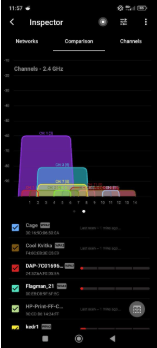
I downloaded NetSpot because my Wi-Fi has been acting slow on my phone.
In Inspector mode, I opened the Channels tab for 2.4 GHz and now I’m confused. There are a lot of colored shapes overlapping each other.
It looks like all the channels are already crowded, so I’m not even sure what I’m supposed to do in this situation. If there are basically no free channels left, is there any point in trying to switch, or is this just normal for a busy apartment building?
That graph is basically showing “how crowded the air is”, but don’t look only at overlap. Pay attention to signal strength too. On that kind of chart, the taller the shape, the stronger the signal. A network overlapping yours at -90 dBm is usually not a huge deal. A network overlapping yours at -55 or -60 dBm is a much bigger problem. So yeah, 2.4 GHz may be busy, but not every tiny weak network is worth worrying about.
Welcome to 2.4 GHz in an apartment building.
People see one tiny neighbor SSID at -90 dBm and immediately act like the Wi-Fi apocalypse has arrived. That weak little network is not kicking down your router’s door. It’s whispering from three apartments away. If another network is huge and sitting right on top of yours, care. If it’s a sad little bump at the bottom, ignore it and go live your life.