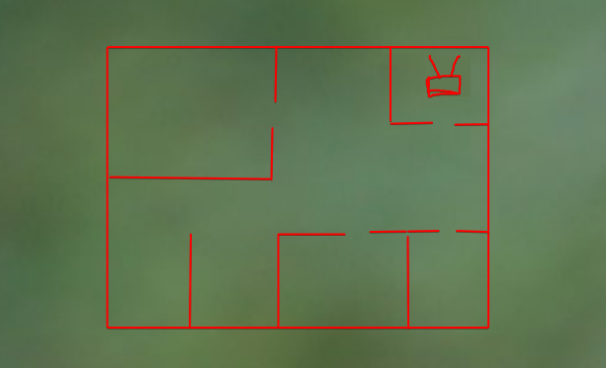
Attached my extremely professional floor plan.
Red lines are walls. The little masterpiece with antennas in the top-right corner is the router.
Yes, I know.
Internet is great in that room and the hallway nearby, but once I get toward the left side or bottom-left rooms, WiFi becomes pretty inconsistent. Sometimes it’s usable, sometimes my phone decides cellular data is the better life choice.
Unfortunately that corner is where the ISP brought the connection in, so moving the router across the apartment isn’t as simple as “just put it in the middle.”
Would one extra AP somewhere near the center fix this, or am I about to create a different problem?
Puts router in extreme corner of apartment, WiFi is bad at opposite corner, “Guys what could possibly be happening?” Physics remains undefeated.
@No_Chart I didn’t choose where the ISP cable enters.
Before buying another AP, actually map the coverage. NetSpot has a survey mode that’s good for exactly this. Drop your floor plan in, walk around and see where the signal actually falls off. Your drawing makes the router placement look awful, but “looks awful on a floor plan” and “needs another AP” aren’t quite the same thing.
@RSSI_Master I’ve mostly been walking around watching the WiFi bars on my phone.
Ah yes, the internationally recognized unit of RF engineering: bars. Use actual dBm values. You’ll probably find the drop-off is a lot more obvious once you map it.
I wouldn’t put the second AP in the dead zone.
Can you run Ethernet along the baseboard? Because one wired AP somewhere near the center would probably make this whole conversation significantly less interesting.