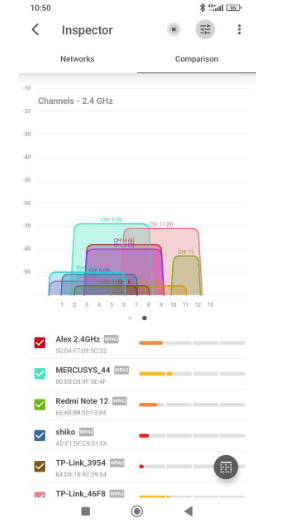
My PC is basically on the opposite side of the house from the router, and that’s really the only place I can keep it.
The weird part is that the internet itself is fast. Downloads are fine most of the time, streaming is mostly okay too. But gaming is where it falls apart — ping spikes, random lag, sometimes it just feels unstable for no obvious reason.
Is there any decent fix for this without moving the whole setup?
Would a better router help, or am I looking at mesh/extender/powerline territory?
I’d check channels first. A lot of people leave the router on default forever, and sometimes it just parks itself on a terrible channel. If that happens, gaming gets ugly fast even though speed tests still look decent.
This is where a Wi-Fi analyzer comes in handy. I’d recommend checking out NetSpot. It’s one of those programs that’s easy to figure out, even if you’re not an expert. If you see that the channel is overloaded, just go to your router settings and manually switch it. Sometimes, this alone is enough to get your internet back on track.
before buying random gear, figure out what the problem actually is. If the signal has to go through multiple walls or a long distance, a better router might help, but sometimes the real issue is just a crowded channel or bad band choice.
@tech_guru23 I honestly haven’t touched channels at all. I just plugged the router in and assumed it would handle that stuff automatically.
I actually checked that with a WiFi analyzer and now I’m even more confused.What am I actually supposed to do with that?
Typical picture. 2.4 GHz gets crowded fast. Can you move over to 5 GHz instead? Your Deco does support both 2.4 and 5 GHz, so that’s definitely worth testing first before buying extenders. Just keep in mind 5 GHz is usually faster, but it also drops off harder through walls, so if that bedroom signal is already weak, it may or may not be the winner there.