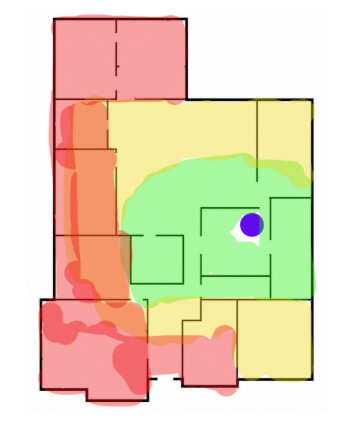
Need some help with this before I buy the wrong thing. This is roughly my house layout. The purple dot is where the current router sits. Green on the map means the Wi-Fi is good, yellow is mediocre, and the red/orange areas are where the connection gets pretty rough.
The far left side is the main problem, plus a bit of the lower-left area. I was thinking about getting a mesh setup, but now I’m stuck overthinking:
It’s a normal home setup, maybe 8–10 devices max, not all heavily used at once.
Let me say this right away: don’t place the second access point directly in a room where there’s no Wi-Fi signal at all. It’s a common mistake to place the repeater in the farthest room, which simply duplicates a weak signal. If there are only two access points, the second one should be placed somewhere in the middle to ensure a good connection speed with the main router.
If you can afford to spend a little more than new equipment, I would first test the layout in a dedicated Wi-Fi network design app. It’s impossible to plan a network correctly based on a simple plan. There are too many additional factors, such as wall materials, interference, planned network capacity, and so on. I use NetSpot for this kind of work, but there are other similar apps — just do a search. You can try both a two-node and a three-node setup in the app and see if adding an additional node actually solves the problem or creates a new one. Alternatively, you can relocate your access point according to the plan; that might be enough. It’s cheaper than buying a three-node kit only to find out that one of them is essentially a decorative element.
You probably don’t need 3 unless the walls are nastier than the drawing makes them look.
@AdLittle2259 Thanks for the tip! I’m still having a hard time grasping all these networking intricacies. Now I’ll try planning Wi-Fi coverage with NetSpot; thanks for recommending the app.