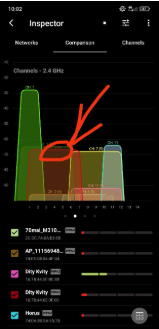
I’m pretty new to this stuff, so I downloaded NetSpot because my WiFi has been feeling kinda off, and now I’m staring at these channel graphs like… yeah, I do not like what I’m seeing.
This is my network, and all the stuff happening around it looks cursed to me.
What do I even do with this?
2.4 GHz almost always looks ugly, so don’t panic just from that screenshot alone. What do 5 GHz and 6 GHz look like? Because if 5 is clean, then the answer may just be “stop caring so much about 2.4”.
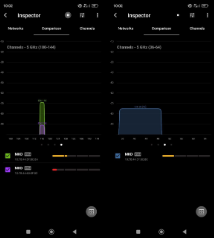
@BluejayKitchen19 I checked again and added the 5 GHz screenshots too.
Your 2.4 looks busy, but your 5 GHz looks pretty clean.
So the obvious answer is:
-
use 5 GHz for anything important
-
stop expecting 2.4 GHz to be pretty
-
only keep 2.4 around for stuff that actually needs the extra range / older-device compatibility
For gaming / work / anything latency-sensitive: run a cable. I am legally required to post this in every WiFi thread.
Accept that apartment WiFi is just cursed.