Hey everyone, trying to fix the Wi-Fi in a client’s apartment setup. I just ran a walk-through survey using NetSpot and the results on the left side look absolutely abysmal. Is this a classic case of thick concrete walls blocking everything, or am I missing something? Should I just buy a secondary AP and wire it to the lower left room?
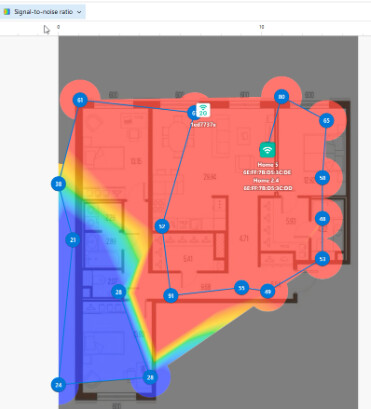
A signal level of -75 dBm in 2026 is the speed of an ancient internet. But judging by the screenshot, you’re only looking at the Signal level. This is a typical rookie mistake.It alone is useless without context. Switch the drop-down list to SNR and SIR (interference). If you have high noise levels, your -75 dBm will turn into a completely hopeless -90 dBm. Show us the rest of the graph parameters before asking for a solution.
Got it, thanks! I’m still figuring out the NetSpot options.
Looking at the floor plan, your APs are all bunched up in the top right corner. You’re trying to push the signal through multiple interior walls, to reach the bottom left. Signal level map confirms the physical blockage, but definitely check the interference layer next. If you have low signal and high interference from neighbors, it’s a total disaster.
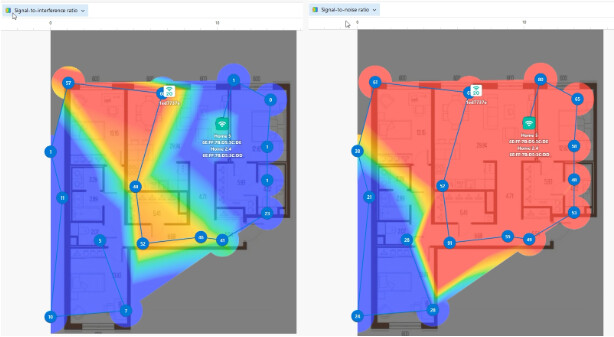
Holy Co-Channel Interference, Batman.  Look at those SIR values on the right side: 0 and 1 right next to the AP. Your network is literally choking to death. Wait, what is that 1ed7737e device? Is that a second router you installed right there?
@user_Jacob_J No, that’s the neighbor’s router through the wall. I have zero control over it. It’s a tight apartment building.
Oof. RIP. That guy is absolutely nuking your 2.4 GHz band. He’s probably running 40MHz channel width like an asshole.
This is why trying to fix Wi-Fi with more Wi-Fi in apartment complexes never works. Look at the left side, it’s completely dead (-75 dBm on your first map) and the middle is pure noise (SIR of 1 and 5). Your client’s devices are constantly waiting for the neighbor’s router to stop talking before they can send a single packet. Don’t even bother tweaking channels. Just run a Cat6 cable to that far left room and drop a secondary AP there on a clean 5 GHz channel.
@CodeWizard I suggested running a cable, but the client strictly said “no drilling, no visible wires.” It’s a rental. Am I screwed?
Can you filter the NetSpot map to show 5 GHz only? Right now you are looking at a combined map. 2.4 GHz is a lost cause here because of that neighbor, but 5 GHz might actually have a decent SIR if you move your router to channel 149 or use a DFS channel. Neighbors almost always leave their routers on default “Auto” channels which crowd the lower bands.
@CodeWizard Let me try to filter it by 5Ghz in the Inspector tab and see if the blue zones clear up. Will update soon.